ATS-Friendly Resume Guide : How to Beat the Robots and Get Your Resume Seen
ATS-Friendly Resume Guide : Your CV seldom gets through to a recruiter on its first try in the fiercely competitive job market of today. Rather, it must first go via an Applicant Tracking System (ATS), an automated digital gatekeeper. Long before a hiring manager even looks at a single profile, an applicant tracking system (ATS) is built to scan, filter, and score resumes based on keywords, layout, and relevancy. This technique is now commonplace in businesses of all sizes, from Fortune 500 behemoths to startups.
Up to 75% of all resumes are automatically rejected by applicant tracking systems (ATS) before they are seen by a human recruiter, according to recent hiring research. Because just one in four resumes are even viewed, ATS optimization is not only beneficial but also crucial. Many new applicants unintentionally exclude themselves because ATS algorithms don’t work with the layout, design, or keyword usage of their resumes.
The good news for new hires or job seekers is that, if you understand exactly what ATS systems look for, creating an ATS-friendly resume is simple. This tutorial explains everything you need to outperform the robots, steer clear of typical rookie blunders, and leverage effective tools like Novorésumé’s ATS-ready templates to significantly improve your interview prospects.
Novorésumé 16 ATS Friendly resume Templates to to Land Your Dream Job
Introduction to Applicant Tracking Systems (ATS)
An Applicant Tracking System (ATS) is software used by companies to manage recruitment. Its main job is to scan resumes, extract information, and rank candidates based on how closely their resume matches the job description. It is essentially a filtering tool that helps recruiters handle thousands of applications without manually reading each one.
The ATS scans your resume for essential components: layout, structure, keywords, clarity, and relevance. If it finds mismatches—like improper formatting or missing keywords—it automatically rejects the resume. This automated filtering is why about 75% of resumes never get seen by a human. For freshers, who often use decorative or non-professional templates, ATS rejection becomes even more common.
Understanding ATS Filters
ATS algorithms work by scanning your resume for readable text, identifying key sections, and matching your skills or experience to the job description. The software detects headings, job titles, dates, projects, and specific keywords. If your resume uses non-standard formatting (tables, images, icons, columns), the ATS may misread or skip entire sections.
Resumes also get rejected due to keyword mismatches. If a job description mentions “Python, Machine Learning, Data Analysis,” but your resume only says “knowledge of programming,” the ATS may deem you irrelevant—even if you have the right skills. Understanding how ATS filters read your resume is the key to passing the screening stage confidently.
Key Resume Mistakes Freshers Make (Each Explained in 2 Paragraphs)
Below are the most common fresher mistakes that lead to instant ATS rejection—each explained deeply so the reader understands why they matter.
Using Fancy or Designer Resume Templates
Freshers often download attractive Canva templates filled with icons, graphics, and multiple columns. These designs may look appealing to the eye, but ATS systems cannot read them correctly. The text inside boxes, shapes, or tables often gets scrambled, misplaced, or ignored entirely by ATS filters.
This leads to poor parsing, meaning crucial information such as skills, projects, and education may be skipped. Even if you are highly qualified, ATS may read your resume as incomplete or irrelevant. This is why simple, clean, and single-column templates—like the ones from Novorésumé—perform significantly better.
Using Non-Standard Fonts and Styling
Many freshers use script fonts, decorative headings, emojis, or bold graphical styles to make their resumes “unique.” However, ATS tools are trained to read standard professional fonts like Arial, Calibri, and Times New Roman. Anything outside this range becomes unreadable to the software.
Unreadable text may cause ATS to skip entire sections or extract incorrect information. Your resume could appear blank or unstructured during scanning. By using standard fonts and professional styling, job seekers increase the chances of accurate parsing.
Missing Job Description Keywords
One of the most damaging mistakes freshers make is not tailoring their resume to match the job description. ATS systems are designed to detect specific keywords the employer is searching for—skills, tools, software, job titles, and responsibilities.
If your resume includes generic skills but lacks job-specific keywords such as “SQL,” “Excel,” “React.js,” or “Business Analytics,” your relevancy score drops. Adding keywords naturally throughout your resume boosts your ATS ranking and increases your chances of reaching the recruiter.
Overstuffing the Resume With Irrelevant Information
Freshers often add excessive details like dozens of online certificates, workshops, or lengthy descriptions of mini-projects. While these may seem important, clutter confuses ATS filters and reduces readability.
ATS prefers clarity, structure, and relevance. A focused resume with proper headings, bullet points, and prioritized content performs far better. Freshers should highlight only their strongest projects and most relevant certifications to avoid overwhelming the ATS system.
ATS-Friendly Resume Templates: Why Novorésumé Works Best
Novorésumé offers 16 ATS-friendly resume templates designed with hiring standards in mind. These templates use clean formatting, simple layouts, standard fonts, and proper sectioning—ensuring maximum compatibility with ATS filters. Their templates avoid tables, icons, and fancy design elements that often cause parsing errors.
Each Novorésumé template includes strategic placements for skills, keywords, project descriptions, and professional summaries. This allows freshers to structure their resumes in a way that is readable both by ATS software and human recruiters. The templates also support the right file types—like DOCX and editable PDFs—ensuring smooth scanning by all ATS systems.
Novorésumé: The Best Resume Builder for Freshers in 2025
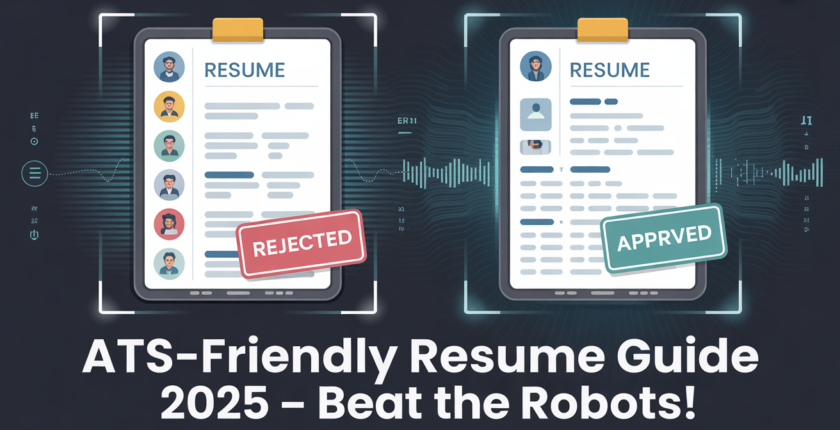
Comparative Analysis: Fancy Resume vs. Novorésumé Template
Fancy Designer Resume
- Contains icons, images, and graphics
- Often uses unusual fonts
- Includes multiple columns or boxed layouts
- ATS reads text in broken order
- Keywords may be missed
- Sections like “Skills” or “Projects” may not be detected
Novorésumé Template
- Single-column, clean, and modern
- Uses ATS-approved fonts
- Clear headings like “Experience,” “Skills,” and “Projects”
- Accurately parsed by ATS in correct sequence
- Keywords are recognized properly
- Enhances resume score and ranking
Recruiters consistently report that ATS-friendly templates provide more accurate parsing, making them ideal for freshers applying to competitive companies.
Best Practices for Creating an ATS-Friendly Resume
Here are proven tips job seekers should follow:
✔ Use standard headings
Stick to headings like Education, Projects, Experience, Skills, Certifications.
✔ Include keywords from the job description
Read the JD and add relevant tools, technologies, software, and responsibilities naturally.
✔ Avoid tables, images, shapes, and icons
These distort parsing and decrease ATS readability.
✔ Use simple formatting
A clean, single-column format is ideal.
✔ Export in DOCX or ATS-friendly PDF
Avoid image-based PDFs or scanned documents.
✔ Tailor your resume for every job
ATS ranks resumes based on keyword alignment—never send the same resume everywhere.
Conclusion
The hiring process today is driven by automation, and your resume’s first reader is almost always an ATS—not a human. By understanding how ATS systems read, filter, and score resumes, freshers can avoid common mistakes and drastically improve their chances of getting noticed. Clean formatting, strategic keyword usage, and the right templates are essential to beating the robots.
Tools like Novorésumé’s ATS-friendly templates help job seekers simplify the entire process. Instead of worrying about design errors or parsing issues, candidates can focus on showcasing their achievements and skills. With the right resume structure, you not only pass the ATS scan but also stand out to recruiters—giving yourself a significantly higher chance of landing interviews and job offers.